






























 The MEDDICC Buyers Guide
 Customer Stories
 Team membership
 What is MEDDPICC?
 NAMIE
 Metrics
 Economic Buyer
 Decision Criteria
 Decision Process
 Paper Process
 Implicate the Pain
 Champion
 Competition
Embed MEDDPICC in the CRM your team already uses
MEDDICC Deals syncs MEDDPICC notes and the strength of every element with Salesforce, HubSpot, and 19 more CRMs in both directions, so your CRM shows the same deal your sellers are working.
Trusted by 2,500+ organizations














“I have been in sales for 20 years. This is the most effective and comprehensive sales training program in the industry.”
“Since implementing what I learned, I've seen a noticeable improvement in deal velocity and win rates.”
“Worth every dollar. So many resources that I can use for the rest of my career.”
“I wish I could give you 10 stars. Phenomenal. Life changing.”
How do I embed MEDDPICC into my CRM?
You embed MEDDPICC into your CRM by adding two fields for each of the eight elements to the deal or opportunity record: a status field (strong, medium, or low) and a notes field, 16 fields in total. Then you connect MEDDICC Deals and map the fields. Every update a seller makes in Deals reaches the CRM in about a minute, and changes made in the CRM reach Deals every 15 minutes.
Why do MEDDPICC fields in a CRM go stale?
Adding MEDDPICC fields to an opportunity record is quick. Keeping them current depends on sellers stopping to type up what they remember, so the fields drift away from what is happening in the deal.
"The fields are there, but half of them are blank."
Forecast calls turn into asking sellers what the CRM should already say.
Sellers capture MEDDPICC where they work the deal, with Winni AI, your AI deal coach, drafting notes from their calls. The CRM record updates on its own, and managers coach and forecast from what happened in the deal.
Pick your CRM
Salesforce
Connect with a Salesforce admin login. Salesforce sets the access scopes for you.
See the Salesforce integration →Fully tested and documentedHubSpot
Connect with a HubSpot private app and seven scopes.
See the HubSpot integration →Supported through MergeMicrosoft Dynamics 365 Sales
Same connection flow. Contact support first to confirm field types.
See the Microsoft Dynamics 365 integration →API
We are working on it.
MCP
We are working on it.
What your team sees once it's connected
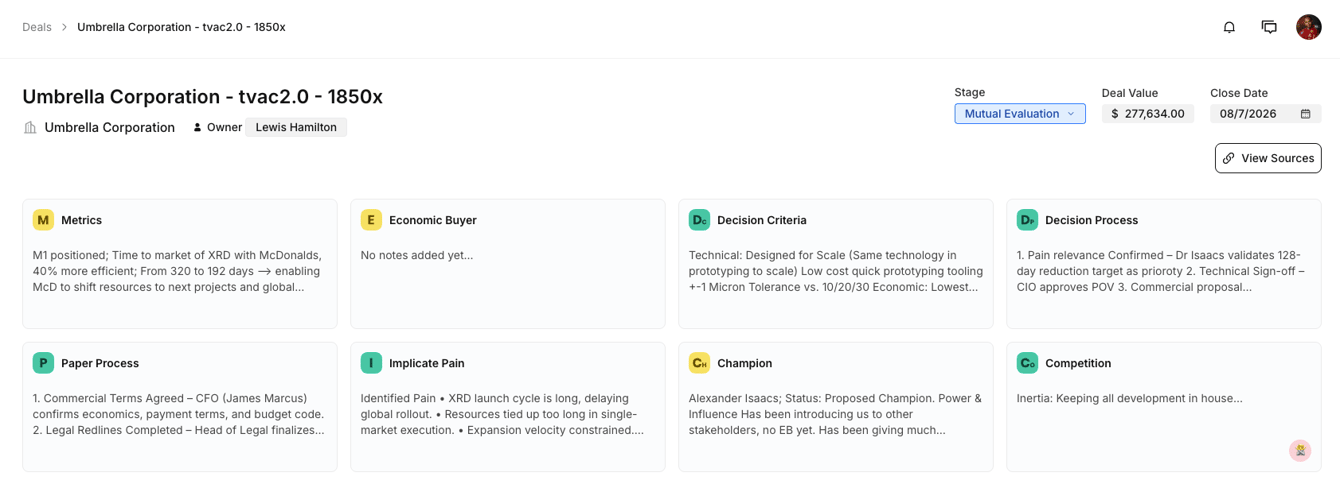
Sellers work the deal in one place
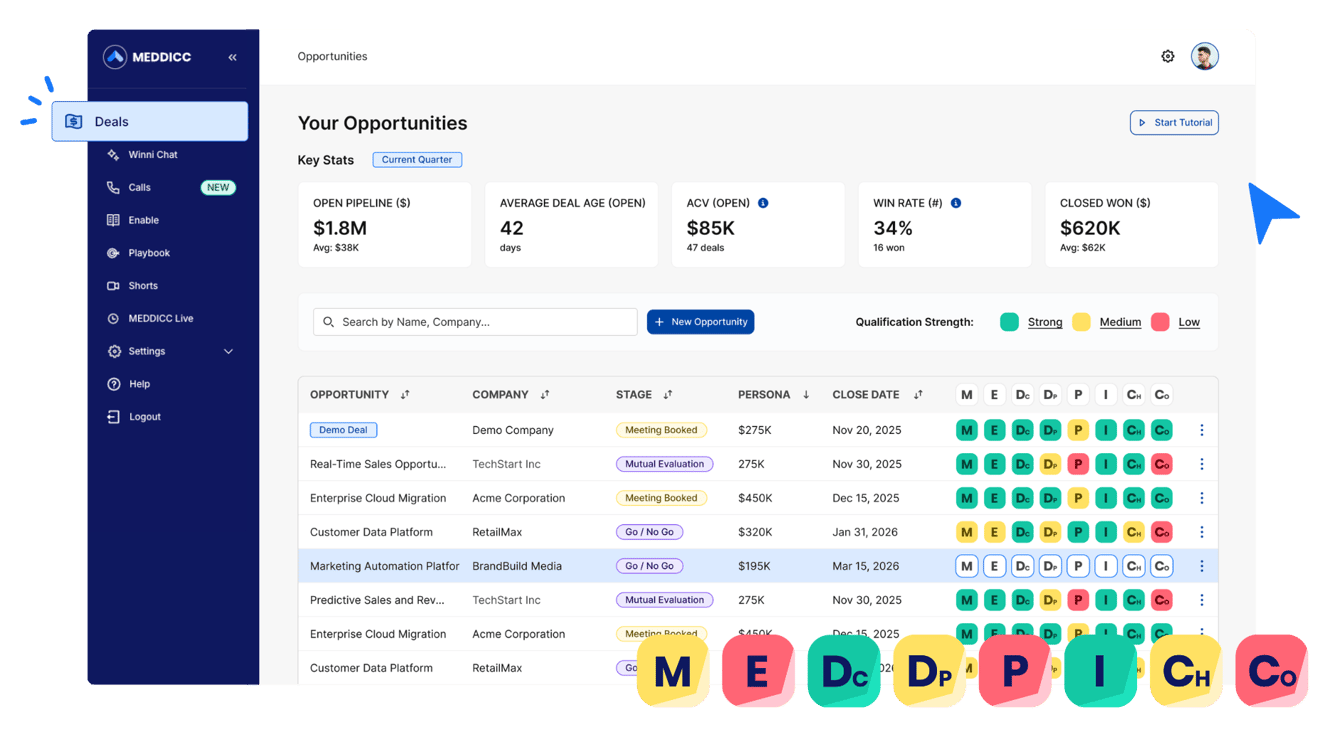
Every deal record is organized by the eight MEDDPICC elements. Sellers add notes as they learn more, the color shows the strength of each element, and gaps are visible at a glance.
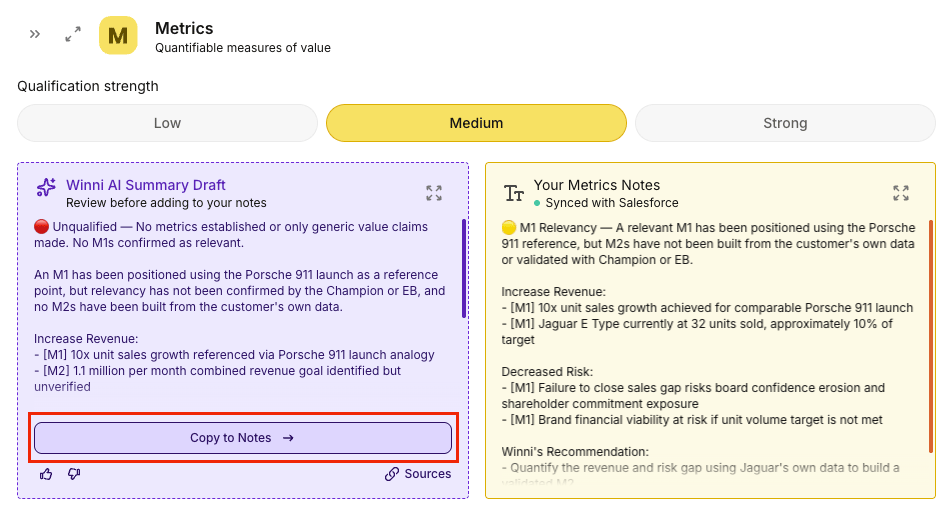
Call notes reach the record without retyping
When a seller links a recorded call to a deal, Winni AI, your AI deal coach, drafts a summary for each MEDDPICC element from the transcript. The seller reviews it and copies it to the deal notes, and it syncs to the CRM with everything else.
Your CRM carries the same picture
Each element has a status field and a notes field on the deal or opportunity record. MEDDICC recommends a dedicated MEDDPICC tab, so the synced fields sit together and your existing layout stays as it is.
What syncs, and which way
| Data | Deals to CRM | CRM to Deals |
|---|---|---|
| Deal name | Yes | Yes |
| Deal stage | Yes | Yes |
| Close date | Yes | Yes |
| MEDDPICC notes | Yes | Yes |
| MEDDPICC qualification strength | Yes | Yes |
| Linked contacts | Yes | Yes |
| AI call summaries | Yes, when a seller applies them | No |
| Call recordings | No | No |
Deals to your CRM: about 1 minute. Your CRM to Deals: every 15 minutes. Regular cycles fetch recently updated deals, and the Refresh button in Settings runs a full sync.
Set it up in five steps
You need CRM admin permissions and a MEDDICC plan that includes CRM integration. The step-by-step guide for your CRM has the field names and types.
- 1
Create the fields
Two per MEDDPICC element on the deal or opportunity record, 16 in total, before you connect.
- 2
Connect your CRM
Start the sync from Deals, authenticate with your CRM, and accept the permissions.
- 3
Map the fields
Match each Deals field to the CRM field you created, or to MEDDPICC fields you already have.
- 4
Configure deal stages
Reorder, hide, and color the stages that came across from your CRM.
- 5
Set deal filters
Choose which deals your team sees by close date, owner, stage, and value.
What your security team will ask
Encryption
Data moves between MEDDICC and your CRM over TLS 1.2 or higher, HTTPS is enforced on every connection, and API keys and tokens are encrypted at rest.
Authentication
Connections use OAuth 2.0 or your CRM's own app keys, with short-lived tokens that refresh automatically. No shared credentials or passwords.
What is read and stored
All opportunity data and fields are synced so you don't need repeated refreshes, and only the fields you map are displayed and used in MEDDICC. Merge, the integration platform, keeps an encrypted copy of synced data to keep the sync reliable.
Certifications
MEDDICC is ISO 27001:2022 certified and GDPR compliant, with annual penetration testing. Merge is SOC 2 Type II certified.
Single sign-on
SAML 2.0 or OIDC through Okta, Microsoft Entra ID, Google Workspace, and other identity providers.
Data residency
MEDDICC and Merge data is processed and stored in the United States. For regional requirements or a Data Processing Agreement, email security@meddicc.com.
How to get it
The CRM integration is part of Deals, which comes with MEDDICC Membership on plans that include CRM integration.
- Get in touchWe confirm your plan includes CRM integration.
- Your admin creates the fieldsSixteen fields on the deal or opportunity record in your CRM.
- Connect and mapStart the sync from Deals, map the fields, and check it end to end.
Questions about MEDDICC CRM integrations
How do I embed MEDDPICC into my CRM?
Add two fields per MEDDPICC element to your deal or opportunity record: a status field with the values strong, medium, and low, and a notes field. That is 16 fields. Then connect MEDDICC Deals, map each field, and your sellers' MEDDPICC notes and qualification strength sync with the CRM in both directions.
Does MEDDICC integrate with Salesforce or HubSpot?
Yes. Salesforce and HubSpot are the two fully tested and documented integrations. Deals syncs deal name, stage, close date, linked contacts, MEDDPICC notes, and the strength of each MEDDPICC element both ways. Salesforce connects with an admin login, and HubSpot connects with a private app and seven scopes.
Which other CRMs does MEDDICC work with?
Deals connects to 21 CRMs through Merge, including Microsoft Dynamics 365 Sales, Pipedrive, Zoho CRM, Copper, Close, and SugarCRM (beta). The connection flow is the same for each one. For CRMs other than Salesforce and HubSpot, contact support@meddicc.com first to confirm requirements and field types.
Do sellers have to enter MEDDPICC in two places?
No. A seller updates a deal in Deals or in the CRM and the other one catches up. Deals pushes changes to the CRM in about one minute and pulls CRM changes every 15 minutes. Call summaries from Winni AI, your AI deal coach, sync too once a seller applies them.
Can we keep the MEDDPICC fields we already have in our CRM?
Yes. Map Deals to your existing fields instead of creating duplicates. First check that every status field uses exactly strong, medium, and low as its internal values, all lowercase. After mapping, run a full data refresh in Settings so your existing MEDDPICC data comes into Deals.
Will connecting Deals change our pipeline or page layouts?
Stage changes a seller makes on a deal sync to the CRM. Reordering, hiding, or coloring stages in Deals Settings only changes how Deals looks. On the CRM side, MEDDICC recommends a dedicated MEDDPICC tab on the record, which keeps the synced fields together and leaves your existing layout alone.
What will our security team want to know?
Data moves over TLS 1.2 or higher, and keys and tokens are encrypted at rest. MEDDICC is ISO 27001:2022 certified and Merge is SOC 2 Type II certified. Data is processed and stored in the United States. Access can be revoked at any time from your CRM's own app settings.
What happens to our CRM data if we stop using MEDDICC?
Everything Deals wrote to your CRM stays there, including MEDDPICC notes and AI call summaries. Once your MEDDICC Membership ends you lose access to Deals, so you can no longer update notes or see Winni AI summaries through it, but your CRM records keep the history.